我们在用SpringBoot开发的时候,经常响应的数据一般都是json格式或者字符串。
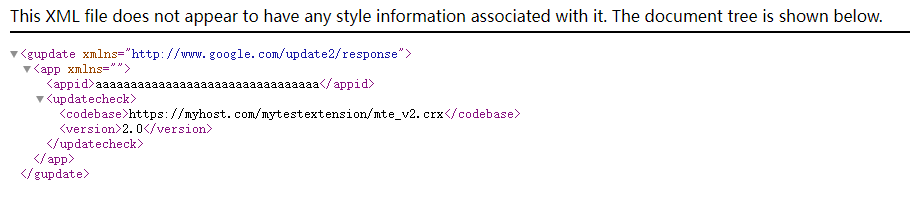
当时偶尔我们也要响应xml格式,比如在更新chrome 插件的时候,如下xml格式:
<?xml version='1.0' encoding='UTF-8'?>
<gupdate xmlns='http://www.google.com/update2/response' protocol='2.0'>
  <app appid='aaaaaaaaaaaaaaaaaaaaaaaaaaaaaaaa'>
    <updatecheck codebase='https://myhost.com/mytestextension/mte_v2.crx' version='2.0' />
  </app>
</gupdate>
那么如何处理呢?手动拼接、替换?其实我们不用这么麻烦,可以用到一个开源库,一下是它的maven
     <dependency>
            <groupId>com.fasterxml.jackson.dataformat</groupId>
            <artifactId>jackson-dataformat-xml</artifactId>
        </dependency>
然后创建三个类:
public class UpdateCheck {

    private String codebase;
    private String version;

    @JsonProperty("codebase")
    public String getCodebase() {
        return codebase;
    }

    public void setCodebase(String codebase) {
        this.codebase = codebase;
    }

    @JsonProperty("version")
    public String getVersion() {
        return version;
    }

    public void setVersion(String version) {
        this.version = version;
    }
}
import com.fasterxml.jackson.annotation.JsonProperty;
import com.fasterxml.jackson.dataformat.xml.annotation.JacksonXmlRootElement;

@JacksonXmlRootElement(localName = "gupdate", namespace = "http://www.google.com/update2/response")
public class GUpdate {

    private App app;

    @JsonProperty("app")
    public App getApp() {
        return app;
    }

    public void setApp(App app) {
        this.app = app;
    }
}
public class App {

    private String appid;
    private UpdateCheck updateCheck;

    @JsonProperty("appid")
    public String getAppid() {
        return appid;
    }

    public void setAppid(String appid) {
        this.appid = appid;
    }

    @JsonProperty("updatecheck")
    public UpdateCheck getUpdateCheck() {
        return updateCheck;
    }

    public void setUpdateCheck(UpdateCheck updateCheck) {
        this.updateCheck = updateCheck;
    }
}
然后再Controller中定义使用。
    @GetMapping(value = "/xml", produces = MediaType.APPLICATION_XML_VALUE)
    public String  getXmlData() throws JsonProcessingException {
        XmlMapper xmlMapper = new XmlMapper();
        GUpdate gUpdate = new GUpdate();
        App app = new App();
        app.setAppid("aaaaaaaaaaaaaaaaaaaaaaaaaaaaaaaa");
        UpdateCheck updateCheck = new UpdateCheck();
        updateCheck.setCodebase("https://myhost.com/mytestextension/mte_v2.crx");
        updateCheck.setVersion("2.0");
        app.setUpdateCheck(updateCheck);
        gUpdate.setApp(app);
        return xmlMapper.writeValueAsString(gUpdate);
    }
以上controller响应需要用到的库。
import org.springframework.http.MediaType;
import org.springframework.web.bind.annotation.GetMapping;
import org.springframework.web.bind.annotation.RequestMapping;
import org.springframework.web.bind.annotation.RestController;
import com.fasterxml.jackson.core.JsonProcessingException;
import com.fasterxml.jackson.dataformat.xml.XmlMapper;
响应结果